Knowing that a prospective patient carries an active policy is only half of financial clearance in addiction treatment and behavioral health admissions. Coordinators and intake directors also need clear deductible, coinsurance, and out of pocket figures alongside practical internal context from past reimbursements before scheduling clinical intake or travel.
Automate Admits pairs electronic X12 270/271 verification through Stedi (covered under our Stedi Business Associate Agreement) with staff only estimates from past insurance reimbursements right on the VOB result card and exported VOB PDF, wherever our reimbursement history has data for that member ID prefix.
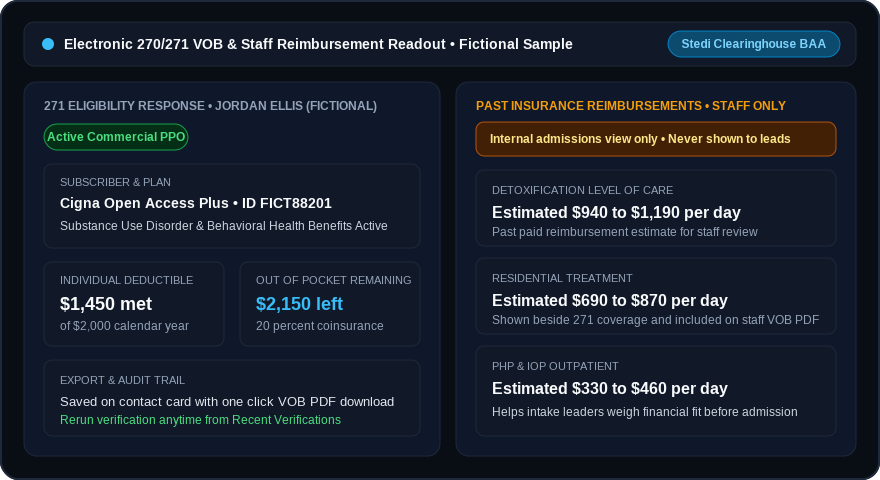
What Your Admissions Staff Sees on Every Verification
1. Real Time Stedi 270/271 Eligibility
Check active coverage status, subscriber details, substance use disorder and mental health benefit lines, individual and family deductibles, coinsurance, and remaining out of pocket maximums in seconds.
2. Staff Only Past Reimbursement Estimates
View internal estimates from past reimbursements for the member ID prefix alongside the VOB result, where our history has data for that prefix, so admissions leaders can review financial fit quickly. These estimates are visible strictly to signed in workspace staff and are never shown to leads.
3. VOB PDF Export & One Click Rerun
Download a clean VOB PDF including the past reimbursements section for your internal intake packet, or rerun a check in one click from Recent Verifications on desktop or from the contact record on iPhone.
How Payer Gating & VOB Fit Together Across Every Channel
Financial clearance starts at the first message, long before a coordinator types a member ID. Across Facebook Messenger, Instagram, website chat, and SMS, your AI admissions agent asks about insurance early and applies your workspace payer gate so calendar slots on Calendar are offered only to leads whose coverage or payment type your workspace accepts, with Medicaid checked state by state.
- Coordinator controlled card details: By default, your coordinator enters the member ID and date of birth on the contact card in the shared inbox. Only if your workspace turns card detail collection on will the AI ask once, after capturing the phone number, and only for a commercial plan or when the lead cannot say what plan they have.
- Optional automatic checks: When automatic checks are turned on in your workspace, Stedi 270/271 verification runs automatically once a contact with card details reaches hot or a later stage.
- Fast team handoff: Once coverage is confirmed, share the lead card directly in internal Team chat, call the lead with Calls, or supervise the intake call with Live Call Supervision (desktop web, once your call center is on).
- HIPAA eligible security: Automate Admits runs on HIPAA eligible AWS services and holds signed Business Associate Agreements with AWS, Paubox, and Stedi, plus a standing BAA and 42 CFR Part 2 QSOA for every customer. Read full details on Trust and Security.
Frequently Asked Questions
Are past insurance reimbursement estimates ever shown to leads or patients?
No. Past insurance reimbursement estimates are strictly staff only inside the workspace and on internal VOB PDF exports, and are never shown or sent to leads.
How are electronic 270/271 eligibility checks run in Automate Admits?
Coordinators can run Stedi X12 270/271 eligibility checks directly from the contact record on desktop or iPhone, rerun a check in one click from Recent Verifications on desktop or from the contact record on iPhone, or enable optional automatic checks once a contact reaches hot or a later stage.
Do verification credits expire at the end of the month?
No. Verification credits never expire. See full VOB credit pricing on the pricing page.