Admissions teams move fast across day, evening, and weekend shifts. When coordinators have to copy a caller’s name out of the inbox and paste it into a separate chat app just to ask clinical leadership about bed availability or VOB clearance, context gets lost and sensitive details end up scattered across unmonitored personal threads.
Internal Team Chat brings team rooms and private chats straight into Automate Admits on desktop web and the iPhone app, sitting one click away from your shared admissions inbox, softphone call log, scheduled intake calendar, and 270/271 VOB checks.
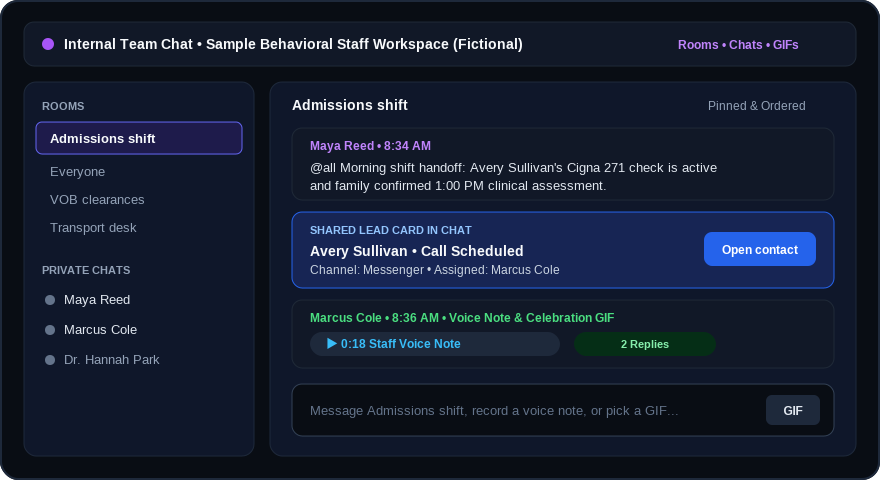
Built for Behavioral Health Shift Handoffs & Intake Coordination
1. Rooms, Private Chats & Replies
Organize conversations in public or private rooms for intake shifts, VOB clearances, or transport coordination alongside one to one and small group private chats, threaded replies, reactions, and pinned ordering.
2. Interactive Lead Cards in Chat
Share any inbox lead into a room or private chat so teammates can see its stage and owner and open the contact in one click without retyping contact details. Owners and admins can assign the lead right from the card.
3. Voice Notes, Mentions & GIFs
Record quick staff voice notes between calls, alert the whole room with an @all mention, customize alert sounds, and keep morale high on busy intake desks with built in GIF search.
Keep Staff Messaging Under Your Workspace Access Controls
Because Internal Team Chat runs inside the same workspace as your admissions pipeline, access follows your exact workspace seats and roles rather than lingering on an ex employee’s personal phone app:
- Unified desktop and iPhone experience: Read room updates, listen to staff voice notes, and tap shared lead cards from the browser or the native iOS app.
- Straight to the lead: Open a shared lead card to go straight to the contact, where you can take over the conversation from the AI agent.
- Encrypted on AWS: Data we store is encrypted in transit and at rest on HIPAA eligible AWS services under our AWS Business Associate Agreement, with a standing BAA and 42 CFR Part 2 QSOA for every customer. Review full security and vendor scope on Trust and Security.
Frequently Asked Questions
What can admissions staff share inside Internal Team Chat?
Staff can message in public or private rooms and private chats, reply to any message, share interactive lead cards that open the contact in one click (owners and admins can assign the lead from the card), record staff voice notes, and post GIFs.
Does Internal Team Chat work on both desktop and the iPhone app?
Yes. Internal Team Chat lives directly inside the Automate Admits web workspace and the native iPhone app so shift handoffs stay in one place without external consumer messaging apps.
Is Internal Team Chat included in Automate Admits plans?
Yes. Internal Team Chat is built into every Automate Admits workspace alongside your shared team inbox, calendar, and AI agent.