Reviewing a call recording the next morning tells an admissions director why a bed placement fell through, after the family has already chosen another facility. When a new intake specialist faces a difficult payer question, a hesitant loved one, or an urgent clinical question, real time support changes the outcome while the caller is still on the line.
Live Call Supervision in Automate Admits gives authorized admissions leaders live visibility into active workspace calls from any desktop browser, inside the same workspace that powers your shared team inbox, 24/7 AI lead response, time zone call scheduling, and Stedi 270/271 VOB checks.
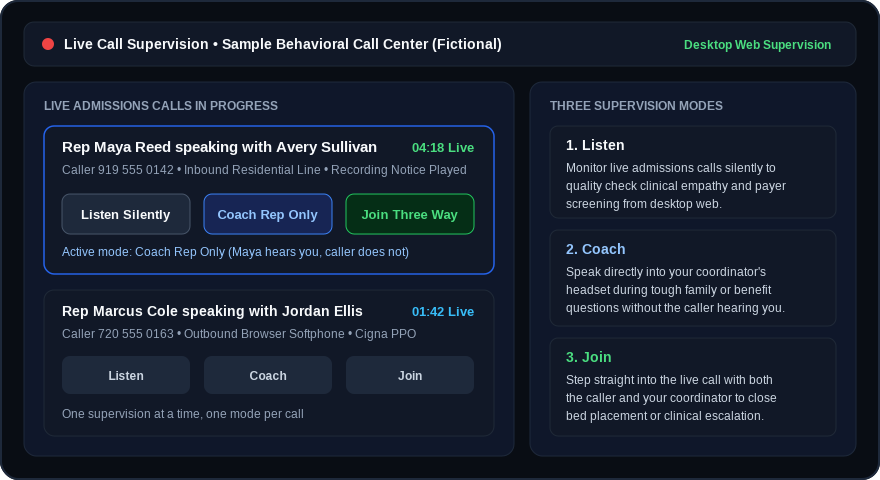
Three Live Supervision Modes Built for Intake Leadership
Once an owner or admin turns on the call center in an SMS & Voice workspace, supervisors can pick a connected call from the live calls list and choose one mode for that call:
1. Listen Silently
Monitor live inbound and outbound admissions calls without interrupting the flow. Hear both the caller and your coordinator clearly to evaluate clinical empathy, benefit explanations, and intake accuracy during onboarding shifts.
2. Coach Your Coordinator
Speak directly to your intake rep while keeping your voice muted to the caller. Guide a newer coordinator through commercial PPO benefits, deductible questions, or travel logistics without breaking rapport with the family.
3. Join Three Way
Step directly into the call so both the caller and your coordinator hear you. Introduce clinical leadership, reassure an anxious parent, or finalize same day admission arrangements together on one call.
Desktop Browser Supervision Without Extra Hardware
Admissions directors rarely sit behind one desk all day. Because Live Call Supervision runs directly through the built in browser softphone, leadership can supervise active calls from any desktop browser, whether they are in the intake office or covering an evening shift remotely.
- Connected to the full contact timeline: Open the caller’s shared inbox thread, read prior Messenger, Instagram, website chat, or SMS messages, and view saved 270/271 eligibility checks while listening to the live call.
- Coordinate quietly in Team Chat: Drop quick context or assign follow up steps in internal Team chat while coaching a live call.
- Recorded after a notice: Calls through your workspace numbers are recorded after a recording notice, and turning on call transcription gives your team a written transcript alongside the call log on Calls.
- Role based access controls: Owners, admins, and coordinators can supervise, and workspace owners and admins control call center settings. Read how calls, recordings, and transcripts are handled, and which vendors carry them, on Trust and Security.
How Teams Use Live Supervision Across Onboarding and Peak Shifts
Behavioral health call centers experience sharp volume swings when paid search campaigns ramp up or evening inquiries arrive. Live Call Supervision lets directors shorten ramp time for newly hired coordinators: instead of shadowing passive recordings for weeks, new reps take live calls with a senior lead listening in and ready to coach or join whenever a complex payer or level of care question comes up.
Frequently Asked Questions
What are the three modes in Live Call Supervision?
Supervisors can choose Listen to monitor an active admissions call silently, Coach to speak privately to the coordinator without the caller hearing, or Join to enter the conversation with both the caller and the coordinator.
Where can supervisors use Live Call Supervision?
On desktop web. Owners, admins, and coordinators can listen, coach, and join live calls from the desktop web app once an owner or admin turns on the call center in an SMS & Voice workspace. Each supervisor also needs their own call center phone line registered.
Which Automate Admits plans include workspace calling?
Workspace calling is part of SMS & Voice ($1,100 on Starter, $1,450 on Growth, $2,200 on Scale) and the discounted All In bundle ($2,900 on Starter, $3,900 on Growth, $6,000 on Scale). Setup help is a paid service on every plan, All In included.